Saturday, 5 March 2011

Friday, 4 March 2011

Preliminary task


Question One

I used Movie maker to answer question 1.

Question Two

I used prezi.com to create question two in a more professional manor.


http://prezi.com/nyui4qavyqn2/question-2/

Question Three

3. What kind of media insitution might distribute your media product and why?

My magazine would be published by I PC Media productions. I choose this publishing site to release my magazine as it suits my style magazine more, as my magazine comes out monthly in comparison to Bauer publications. I also didnt chose bauer because they are oublishers of Q, Mojo and Kerrang, i chose ipc media because this is a well known publisher and i feel they would advertise my magazine in anyway possible. Choosing ipc Media allows there to be competition and revearly between the two publishers to create competition. NME is published weekly and sells over 350 million copies a year! Therefore as my magazine is a monthly release the publishers would have a weekly and monthly magazine to publish.

http://www.ipcmedia.com/

IPC Media also produce: NME which is a well known music magazine.

Question Four

My intended target audience is teenagers and above of both genders aged from 13 +

Who would be your audience for your media product?


Name: Jemma Murphy
Age: 16
Gender: Female
Hobbies: Shopping, reading and listening to music
What music do you like to listen to? Indie
Who is your favourite artist/band: The script

How often do you listen to music?:
1-2 hours daily
Do you like to buy music magazines? if you what ones? Yes! i like Q
How do you listen to music? Ipod
Other: - full time student, with a weekend job.
- she likes to keep up to date with fashion!
- favourite colour is red.
- social life: internet shopping, facebook, parties and dancing.


Name: Hannah Heffernan
Age: 18
Gender: Female
Hobbies: Catching up on the latest news and fashion and listening to the latest music!
What music do you like to listen to? Indie music if my favourite
Who is your favourite artist/band? I love to listen to the Kings of leon.
How often do you listen to music? up to 3 hours a day
Do you like to buy music magazines? if so which ones? Yes, i like NME
How do you listen to music? Tv, laptop, ipod, radio
Other: - always on trend with fashion, gagets and latest music.
- works in retail
- favourite colour is pink
- likes socailising with friends and family, going on holiday and relaxing.


Name: Daniel Parker
Age: 20
Gender: Male
Hobbies: music, sport and reading
What music do you like to listen to? Indie and rock
Who is your favourite artist/band? Mumford and sons!
How often do you listen to music? everyday for about 2-3 hours
Do you like to buy music magazines? if so which ones? NME, MOJO and Q
How do you listen to music? CD's, radio, ipod and laptop
Other: - Works full time
- favourite colour is red
- spare time hangs out with friends, plays sport and buys music magazines.


Daniels favourite song and band.


Audience feedback:


Here is a screen shot of some audience feedback, on the social networking site facebook.

Question Five

Question Six


http://prezi.com/af6k2ss1vvuo/technologies/

Question Seven

I have used Movie maker to answer question number 7.


Wednesday, 2 March 2011

Using Quark to create my Double page spread

After previously using this software to create my contents page, i found it easier to use as i knew the correct tools in which i needed to use. Creating my double page spread was similar to creating my contents page due to using the same tools, however the text and the images had to be positioned and styled in a different manor to suit the codes and conventions of a double page spread. Below are a few screen shots of how i created my final double page spread.


Below is how i imported my image to the document. After uploading the image i then had to resize the image completely in order to meet the codes and conventions. Therefore i had to edit the image alot to create the desired size. I also changed the colouring of my image using the tools provided to make the image stand out more by making it look more effective.


Differently from my contents page i had to create 3 columns for my text. I used the tool bar situated at the bottom of the picture and changed the number of columns to 3. I also included a drops cap at the beginning of my article to make it look more professional but to also follow the codes and conventions.


Below is my final version of my of my double page spread.


Using Quark to create my contents page

Using Quarkxpress to create my contents page proved difficult due to me not using it before. However, it was easy once i picked up all the techniques to create my desired effct. Below are some tools i encounted to create my finished contents page.


These are the following tools i used to create my contents page.

The following images were used on my contents page.


I used the 'A' tool on the tool bar shown above to create my text, i then changed the font style, colour and size to suit my desired design.


After taking several photographs for my contents page i then uploaded them to my computer using a usb cable. To import them onto my document i drawn a box using the image tool on the tool bar, i stretched it to my desired size and then right click and imported my image. If my image was too small or too big i would resize it by dragging it to an approved size, then simply clicking "scale picture to box".


After importing my text i then added detail in order to form to the codes and conventions, i simply created a red thick line using the shapes tool, to place underneith the page references in order for them to stand out. I then copied and pasted them to suit the positioning of the text.


Here is my final version of my contents page. After using all the tools above to create my document i now feel confident when using Quark if i were to come across it in the future.

Tuesday, 1 March 2011

Using Photoshop for my front cover

After looking at my front cover in comparison to the codes and conventions of a magazine front cover, it didn't develope or challenge forms of codes and conventions.
Therefore, i took into consideration what needs changing in order to improve the appearence for my target audience, there for i asked various people within my target audience what works and what doesn't. The main reasons are as follows: The image, the colours and the coverlines.
After asking around my target audience i took into consideration what things they didnt like and changed them in order to fully engage my target audience into buying the magazine.


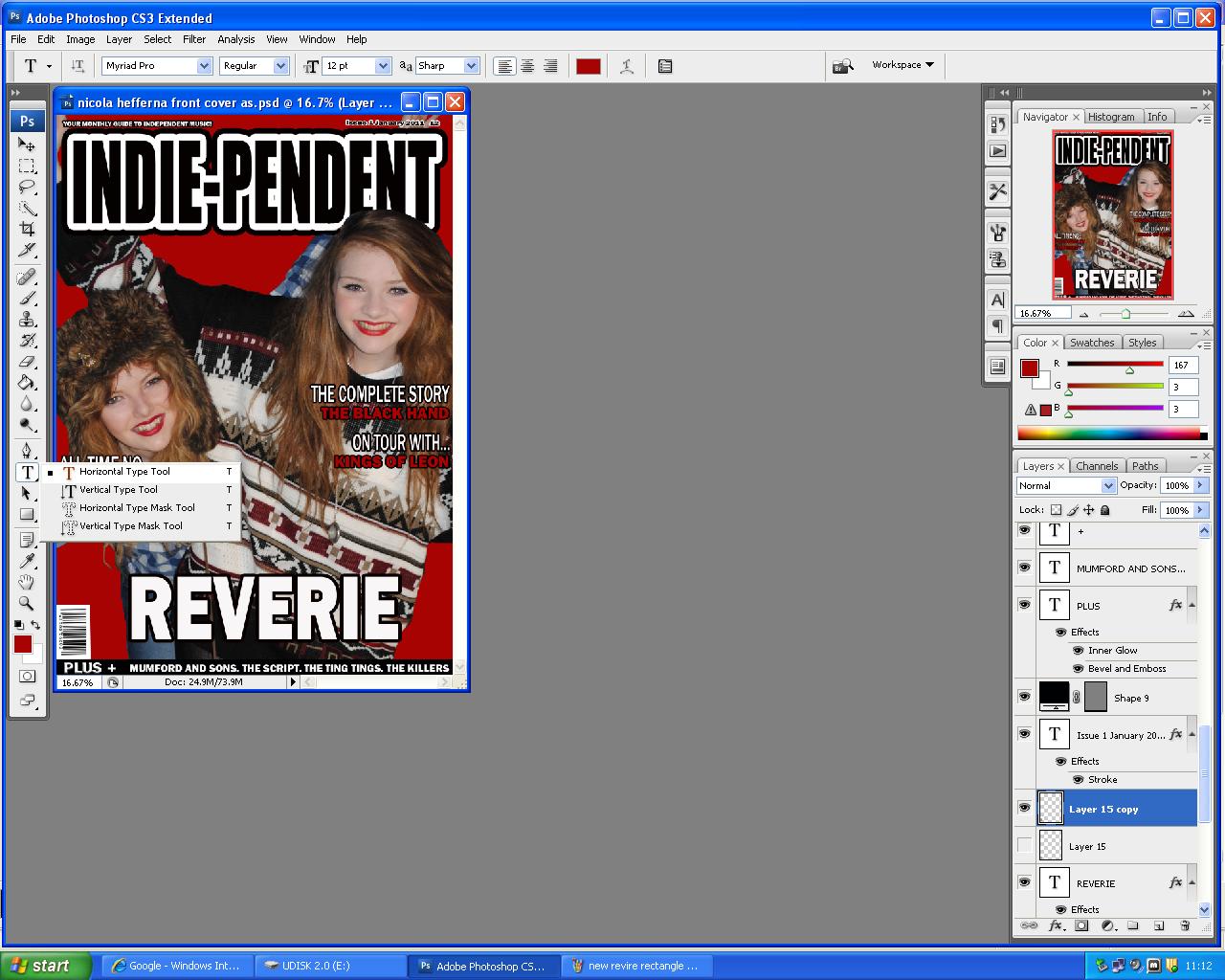
The following image shows you how i created my masthead in order for it to stand out for my target audience. I also stretched and re-sized the text box usinh "Ctrl T".


After getting feed back from my taget audience, they said that the central image didnt work due to the lack of colouring on the background making it look dull. Therefore, i took some more photographs (listed below).


After choosing my image for my front cover i then decided on creating my coverlines using the text box tool and the shape tool in order to customise the coverlines to suit my magazine style.


Production work

Below are rough drawings of my new layout for my magazine, i have changed the layout and images from my previous drawings due to my survey results therefore in order for me to fully attract and engage my target audience i have listened to their critisim to enable to design my front cover, contents page and double page spread.

Thursday, 20 January 2011

Photographs for my front cover

The following images were used on my old front cover, they are not suitable enough due to the lack of codes and convents desired for a front cover image. The following images were uploaded to Gifup.com to enable my pictures to be presented in a professional manor.

gif animation maker
Gif animation maker

Saturday, 15 January 2011

Screen Shots of my front cover

After using the software Photoshop previously to produce my school magazine, i found it much easier to use as i was familiar with the tools. This was useful as i was able to produce mass peices of work at a fast pace therefore i was able to stick to my deadline.
Below are some screen shots on how i produced my finished front cover. Each image will show different stages in the manufacturing of the front cover with a brief description below.


The above image shows the first stages of my title for my front cover. To achieve the text that is on the image i simply clicked on the "T" symbol on the left tool bar, i then clicked on the white blank canvas were i then typed my title "Indie-pendent" I then resized and change the font style to 'IMPACT' i changed the font size in order to make it run across the top of the page as i was clearly following the codes and conventions of a masthead. I then decided that i didn't want a basic masthead so then i took on a very difficult process were by i had to duplicate the layer so i was able to create a shadow behind each of the layers, this proved difficult however this is the finished masthead below.

After creating my title i then started to work on my central image. I originally started with a photograph taken from a digital camera which i loaded to the computer via a USB cable. I then uploaded the file to photoshop simply by clicking on "Import image" from then i started deleting the background using the "Select" tool and "Rubber" tool featured on the tool bar to the left hand side. This proved difficult to crop around the image as there were tiny areas i couldn't see properly, therefore i was able to zoom in using "Ctrl+" this was so i could zoom in to the percise area i wanted to essure i rubbed out the remains of the background.
After cutting out the background, i realised that the different levels of the four band members didn't work for the front cover, so i came to a decision were by i had to duplicate the layer by four were on each of the layers i was to leave one of the band members but get rid of the other three. E.g. on the layer above i cut out three of the band members leaving just one on the layer. To cut them out i used the "Polygon select" tool (featured bottom left) once i had cut around the image it would select were i have cut by producing a dashed line. (Bottom right) From then, i was able to press "CtrlT" to select the image to resize.
After cutting the central image and resizing the individual images i was able to apply the rest of the content. For me to create my headlines i simply clicked on the text tool on the left hand side "T" and clicked on the white A4 paper. After typing my text i then changed the font to "Stencil std" and changed it to a desired size. To create the shadow look behind my text i double clicked on the text layer to the bottom right which then appeared a box which i simply clicked on "Drop shadow". For my main cover lines i applied coloured boxes behind the text using the shape tool, i also applied the drop shadow to make them stand out. Also on the main cover lines i double clicked on the text layers and applied a white stroke.

Thursday, 25 November 2010

Production

In today's lesson we started producing the material for our magazine.
I used my planning production sheet to enable for me to take my pictures, as there was a list of certain images i need to include on my front cover, contents page and double page spread.

The following image will be used as my Front cover image.


In order for this image to be my central image i am going to crop it, so it will just be the four of them standing there, however, there will still be some form of background therefore when editing my magazine image on Photoshop i will use one of the following in order to have a plain background.


The following images will be used on my contents page.


I will use the image on my contents page to represent a singer, this corresponds to the featured articles.
I will edit this image on Photoshop to make it look more proffesional and to suit the genre of my magazine.


The following image will be used on my double page spread interview.


This image will be used on my double page spread as the pose is casual. This image will bleed across the left page to a section of the right.


Above is a drawing of how my magazine will look if i follow my step by step plans.

Wednesday, 24 November 2010

Article Research

Article Research
After planning out my front cover and contents page, I have carried out some research in order for me to conduct an interview. I looked on the following websites to gather information on how to set out my interview.
I used the following link: http://www.nme.com/magazine to obtain a rough idea on how my double page spread should look. Here is an example of a double page spread from the magazine “NME”.


After analysing various different magazine articles on the website above, I am going to have my central image on the left side of the article, and increase the size so it bleeds over the page. On the right hand side of the features article will be my interview with The Black Hand.
I researched my band on Google and the following link came up linking to the band:
Direct quote from Josh Gilroy (former BackToBasecamp drummer)
Josh said: “We’re all very excited about what’s happening at the moment. After releasing the EP we released a video for one of the tracks and that went down well. “We’ve since started focusing on the new record and with that I think we’ve all got this new attitude and working with Brad last time was so much fun I can’t wait to do it all again.”
I also analysed the magazine MOJO to get a rough idea on what to include on my interview.
I looked at some featured interviews and analysed the questions. For example: http://www.mojo4music.com/blog/2010/03/ian_hunter_qa.html
After looking at these various questions, I have taken into consideration the style and tone to create my own. They are as follows:
· The Black Hand were did you originate?
· How did the band originally form?
· Who does the song writing?
· Best gig?
· So, The Black Hand is performing at the Liverpool O2 academy, is this your biggest performance yet?
· I heard your next gig will be at Sheffield, is there a reason as to why your playing in Sheffield and not locally?
· Your going on a break, is there much to expect for your return?
· Ok, we understand you’ve been working on a record, when did that start for you?
· What sort of songs have you been recording?
· And there will be new material from your new songs?
· So, flash forward a decade, your playing at V. Is it something we should see?
Double Page Spread
The Black Hand!
They're the button pushing, proverbial prankters who are leaving an imprint around Wirral! Rock into the crazy, creative world of The Black Hand as we unfold their secrets, future plans and their up coming gigs!
The Black Hand are a Wirral band who have played at O2 accademies across the country. The four piece indie band cpnsisting of Ben Hopkinson (Singer) Ben Silvester (Guitarist) Nathan Ford (Bassist) and Josh Gilroy (Former Drummer), discuss with Indie-pendent their career so far and their plans for an album release.
In a casual laid back atmosphere, Indie-pendent found out the in's and outs about The Black Hand. I asked the group how they became the phenomenon band that they are! However, Nathan Ford was kindly given the unfortunit name 'Bungo' by his band mates due to his radiant ginger locks. Bungo answered: "me and Ben (Silverster) jammed in a basic shed with limited space, it was crammed but great! but me and Ben thought we needed to progess further ... so we started looking around facebook and asking close friends if they knew any drummers who wanted to be in a band. Then we found Josh Gilroy through a friend and now Josh is the drummer of The Black Hand. From then we were just making the music as none of us could sing, so we'd thought we should ask around for a singer to get the band going. So again we asked around using facebook and our close friends and we stubbled along Benjy (Ben Hopkinson) who (laughing) turned us down originally! However, we put our differences aside and thought about the possible outcome of the band and gave it a shot. Now Benjy is the enious behind the voice.
Being in a band takes time and commitment, and after asking the boys, we at Indie-pendent find out just how hard it actually is! I asked them who does the most important part... the song writing. Benjy answered " well im not just a pretty face you know, i am the brains behind those brilliant lyrics" (laughingly the band don't disagree!)"Well these guys would write a song/music peice so we get the backing track, then they'd pass it to me were i would then come up with the lyrics, but its a repeated process as the lyrics may not go with the music or the lyrics would just turn out cheesey! Then we'd all meet up as a band and attempt to put the whole thing together, lets just say its challenging and some of them end up with my hands around their necks, but it is worth it and rewarding at the end." So The Black Hand have only been together for 3 months and are already a phenomenon! "Best thing to happen since The Wombats!" Wirral Globe. Now lads, that is some review! being compared to The Wombats! how does they make you feel as a band? "Incredible! To achieve a title and repretation within 3 months of being together we are all excited to see what the future holds for us".
You have already played at O2 accademies across the Wirral and Manchester, your biggest performance surely has to be Liverpool O2 accademy. However you didnt get paid for it as you were a supporting act. But their best turn out has been at a local gig at The Nelson, raising a whopping £21!! There was a commical atmosphere after discussing their fame and fortunes... or for them to realise they weren't going anywhere fast! Althought they havent had there major break through they seem to be rolling it in "Yeah we all have houses now, one for everyday after splitting our £21!, yeah that's right im staying in my thursday mansion tonight". After laughing about their misfortunes Indie-pendent find out their music is broadering horizions! The Band recently had an email from a managing record label in America. Yes, America! Their songs have reached over sea's by 'Youtube'. He thinks the band are talented and are just what people need.
Could this be the big break for The Black Hand? Fingers crossed!
We want your say, Email us @ Indie-pendent@info.com
But just remember you heard them here at Indie-pendent first!

Thursday, 18 November 2010

Planning Production

Planning Production

In today's lesson we were told to produce a planning production on images we are going to include on our front cover and contents page. We also have to create numberous questions in which we were going to ask in our interview.

After carefully analysing my questionnaire results I have come to a conclusion that my magazine will consist of the following, due to popular demand:
Front Cover images - My main image will be the featured band within the issue. In this case it would be “The Black Hand”. The image would consist of the band posing at different ground levels, with the hands in the pockets to give it a more casual look. The mise en scene would be bricks or tiles.   
This is the image I am going to be using as my central image on my front cover.
Contents page  Main image will be of the band “The Black Hand “sitting on a wall, this will correspond to the featured article.


Text for Contents page   The text for my columns will be times new roman size 12pt.

Cover lines 
       -    Exclusive interview with “The black hand”.
-          Up coming Gigs for 2011
-          Top 10 Artist to look out for this year
-          “The Black Hand up close and personal”

Regular Content  
Page 2 Editors letter
Top 10 Indie singles of the month
-   Album reviews
-   Up coming Gigs
-    Events
-    New Artists
-    Em@il us
-    This months latest
-   Last months catch up
-   Feedback on artists
-   Subscribe!
-    Quiz Time!
-  Posters


Featured Content

-          The Black Hand  exclusive interview
-          The wanted
-          Kings of Leon
-          The script
-          All time NO....
-          Heard it here first
-          Live reviews
-          Latest gig reviews
-          Your say on the latest releases
-          Ellie Goulding
-          Want to make it into the industry?
-          New artists to look out for 2011
-          New song releases to look out for 2011
-          Up close and personal with Josh Gilroy! The black hand!


The main article will be an exclusive interview with The Black Hand. I will be asking them about how they originated, about their gigs and what shall be look out for in the future.


Publication plan

Title Ideas


Position statement:   Your monthly guide to music!
Frequency of publication:  Monthly
Price:  £2.99
Distribution:  News agents, super markets and gigs.
Rationale: The approach of the magazine is for my target audience to get the latest news and information about their favourite bands. The articles and interviews will focus very much on my target audiences favourite bands/artists.
Style:  My style of magazine is going to be informal for people who enjoy indie music. The articles will be short but enjoyable including colloquialism.
The images will dominant my front cover and also my contents pages. These images will correspond the main featured article.
Regular Content   
-  Editors letter
-   Top 10 Indie singles of the month
-   Album reviews
-   Up coming Gigs
-    Events
-    New Artists
-    Em@il us
-    This months latest
-   Last months catch up
-   Feedback on artists
-   Subscribe!
-    Quiz Time!
-  Posters

Featured Articles
-          The Black Hand  exclusive interview
-          The wanted
-          Kings of Leon
-          The script
-          All time NO....
-          Heard it here first
-          Live reviews
-          Latest gig reviews
-          Your say on the latest releases
-          Ellie Goulding
-          Want to make it into the industry?
-          New artists to look out for 2011
-          New song releases to look out for 2011
-          Up close and personal with Josh Gilroy! The Black Hand!

House Style

Cover lines:  Adobe Caslon Pro Bold
                 and Arial.
Headlines: Britannic Bold 
Stand first: Britannic Bold 14pt.
Caption: Arial 8pt.
Features first paragraphs:  Drop capital Britannic Bold, 5 lines deep and first two words in capitals.
News first paragraph: The first word in bold capitals.
Body text:  Times New Roman 12pt.
Colour scheme: Red, White and black.